Google Search

Google

What is the most suitable distro to use as a server?

Visit Us!

Google Groups
Kuantan Linux User Group
Visit this group

Threat Resource Center | Trend Micro

Wednesday, May 2, 2007

Installing Internet Explorer on Fedora Core 6

After installing Fedora Core 6 on my notebook, i was thinking and curious to try to install Internet Explorer on this distro to see how it works. To make it happen, all we need to do is to get wine and and cabextract file. To get this two files, we need to use yum to download both of it.

1. Open Terminal, make sure you are root. Type : yum -y install wine*


2. Finish downloading installing wine files


3. After installing the wine, the next step is to yum the cabextract. Type the command : yum -y install cabextract


4. Get the ie4slinux file using wget command.
wget http://www.tatanka.com.br/ies4linux/downloads/ies4linux-latest.tar.gz


5. Then, untar the ies4linux-latest.tar.gz file using this command : tar zxvf ies4linux-latest.tar.gz

6. You will be asked a few question regarding the Internet Explorer installation. Just follow the instruction.


7. The related file will be downloaded and the installation will be run automatically.


8. There should be no problem at all when you are reaching this step unless in a certain situation you are facing problem. Thank god, the installation is finish.... :-) After this step, what you need to do is type this command : ie6 and hit Enter


9. Finally, the Internet Explorer is on your Linux distro. The congratulation page will be appear to tell that your installation are successful. There are also a Internet Explorer icon at your desktop. Just click it to use it.


10. The Internet Options are still like on Windows. Surfing until die.... ;-p

Sick of viewing the too many Windows? Check this out


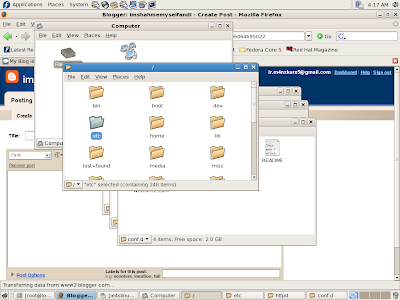
When using GUI to open up a file, sometimes it will make you feel dizzy. Why? Because multiple windows will appear. Imagine, you just want to view httpd.conf file but on your desktop, there are many windows appear. All you need to do is just follow this very simple step :

1. Open Computer
2. Click on Edit > Preferences
3. Behavior > Choose Always open in browser windows > Close
4. Try to re-open back the directory
5. No multiple windows on your desktop anymore
6. Have a nice day!!! :-)

Thursday, April 19, 2007

MAMPU-OSCC (Open Source Competency Centre)

What is OSCC ?

OSCC is stand for Open Source Competency Centre and it is a part of MAMPU (Malaysia Administration and Modenisation Planning Unit). MAMPU is one of the government agency under Malaysia government. OSCC are providing a services that based on a Open Source. It is responsible to make an implementation of open source software in a government sector. OSSC are offering a lot of benefits to civil servant that working especially in a IT field. One of the best thing is they are offering a FREE fees training cost. :-) If you seat for Linux Fundamental training at the any training provider, at least you need to spend RM thousand. But, at OSCC you don't need to think about fees.


Me At OSCC

I'm one of the lucky person i guess chosen to attend the Linux Fundamental courses at OSCC on 17 April - 18 April 2007. It is not easy to be invited because there are so many government staff out there waiting for their turn. The two days course give a lot of information to the trainee, meet new friends and so on. The facilities are good, with the HP Compaq dc7700 CMT and powered by Ubuntu 7.04 64bit (Feisty Fawn), it is a very good experience and exposure for me to improve my skills and knowledge.


Wednesday, April 18, 2007

MC - Midnight Commander

What is Midnight Commander?

DESCRIPTION
GNU Midnight Commander is a directory browser/file manager for Unix-like operating systems.

I'm learning something new during my training at OSCC. It is Midnight Commander a Linux file browser. Basically, it seems like Windows Explorer but the interface is less icon and less graphical look compared to Windows Explorer. To use MC, you can just use the given function key F1 until F9. Even, it's more to command line look, user still can use mouse to use it. Easy huh? Really2 easy la i can say. :)


Install MC if it is not installed yet on your machine. How to install? It's simple. I'm using Ubuntu when I'm write this post.


GUI installation
System > Administration > Synaptic Package Manager > Search type MC > Double click MC > Install

Command line installation
root@training20-desktop:/home# apt-get install mc

DONE!

Saturday, April 14, 2007

My Linux server won't display anything!

I'm back on my duty after a week spending my time to prepared for my examination. I was shock when i see there's no display appear at my Linux server monitor. Where did the desktop go?? I have experienced this things but the thing i do is just reboot the server. [root@db~]# init 6 then everthing is back on normal. But this time i will never ever doing that way. I will try to find how can i fix such problem and yes Internet are the most total solution for you.

1. I try to ping my webserver from db server and it's alive
2. SSH to my webserver using root account
3. Enter this command
[root@apps ~]# ps aux | grep 'cat /tmp/.X0-lock'
4. Then it appear such message
root 4856 0.0 0.0 3912 692 pts/4 S+ 11:44 0:00 grep cat /tmp.x0-lock
5. Enter this command
[root@apps ~]# start --x:1
6. And the display on my webserver is back again!

Linux News Of The Day!

Powered By
widgetmate.com
Sponsored By
Credit Card Forum